
rtfreporter turns the tables you already make in R – an ARD from cards / cardx, an rtables / tern or a gtsummary table – into clinical RTF files: running header and footer, page numbers, titles and footnotes included.
Why rtfreporter?
- Your packages’ tables, straight to RTF: cards / cardx ARDs, rtables / tern, rlistings, gtsummary, gt, tfrmt, flextable, huxtable, data frames.
-
ARD first: an ARD becomes a table in a few lines,
(N=xx)included. - Submission-ready pages: running headers and footers, titles, footnotes, pagination, listings and figures.
- One deliverable: outputs assembled with a cover page, a clickable table of contents and PDF bookmarks (how).
- Small, on purpose: one clinical layout, base R only.
Installation
Not on CRAN yet; from GitHub:
remotes::install_github("ichirio/rtfreporter@v0.8.2")   # the latest release
remotes::install_github("ichirio/rtfreporter")          # the development version
From an ARD to an RTF table in 30 seconds
The ARD is the input, made with cards / cardx before rtfreporter. From there it is three steps:
|
The ARD made with cards / cardx |
1. The tableard |>normalize_ard() |>table_plan() |>plan_*()
|
2. The reportrtf_document() |>rtf_section() |>rtf_tables(plan)
|
3. The RTF filegenerate_rtfreport()
|
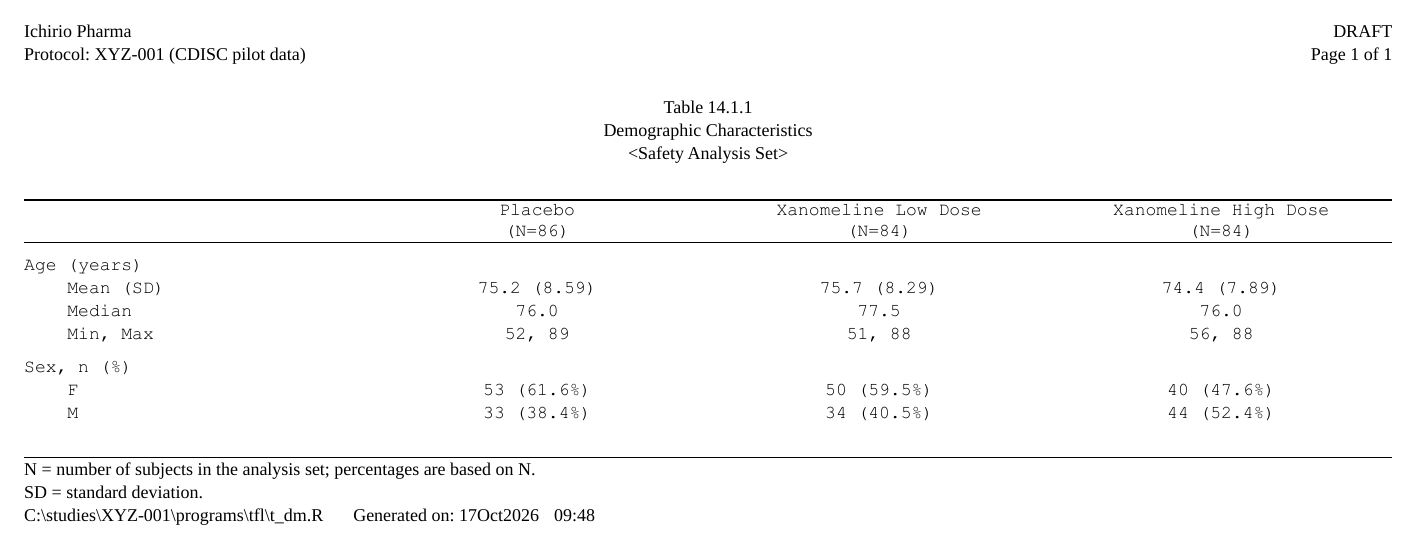
The page they write:
The code:
library(rtfreporter)
library(cards)

# (ARD): made with cards / cardx -- data preparation, outside rtfreporter
adsl <- ADSL
adsl$ARM <- factor(adsl$ARM, c("Placebo", "Xanomeline Low Dose", "Xanomeline High Dose"))
ard <- ard_stack(adsl, .by = ARM,
                 ard_summary(variables = AGE),
                 ard_tabulate(variables = SEX))

# 1. the table, straight from the ARD
plan <- ard |>
  normalize_ard() |>
  table_plan(cols = "ARM", rows = c(group = "variable")) |>
  plan_cells(continuous  = c("Mean (SD)" = "{mean:.1f} ({sd:.2f})",
                             "Median"    = "{median:.1f}",
                             "Min, Max"  = "{min:.0f}, {max:.0f}"),
             categorical = "{n:.0f} ({p:.1f%}%)", notes = FALSE) |>
  plan_labels(c(AGE = "Age (years)", SEX = "Sex, n (%)")) |>
  plan_stub() |>
  plan_col_header(values = list(n = TRUE), rtf_col_header(c("", "{col}\n(N={n})")))

# 2. the report: the document around the table
report <- rtf_document(
  program = "/studies/XYZ-001/programs/tfl/t_dm.R",
  tokens  = list(STUDY = "XYZ-001")) |>
  rtf_section(
    header = rtf_header(list(
      c(l = "Ichirio Pharma",                      r = "DRAFT"),
      c(l = "Protocol: {STUDY} (CDISC pilot data)", r = "Page {PAGE} of {TOTAL_PAGES}"),
      c(c = ""),
      c(c = "Table 14.1.1"),
      c(c = "Demographic Characteristics"),
      c(c = "<Safety Analysis Set>"))),
    footer = rtf_footer(list(
      c(l = "N = number of subjects in the analysis set; percentages are based on N."),
      c(l = "SD = standard deviation."),
      c(l = "{PROGRAM_FULL}    Generated on: {DATETIME}")))) |>
  rtf_tables(plan)

# 3. the RTF file
generate_rtfreport(report, "t_dm.rtf")
The arms’ (N=xx) come from the ARD: ard_stack(.by = ) counts them. The same code pages a long table, sorts an adverse-events table by frequency, and can be saved and reused: Get started, Tables from an ARD, and more tables, listings and figures in the Gallery.
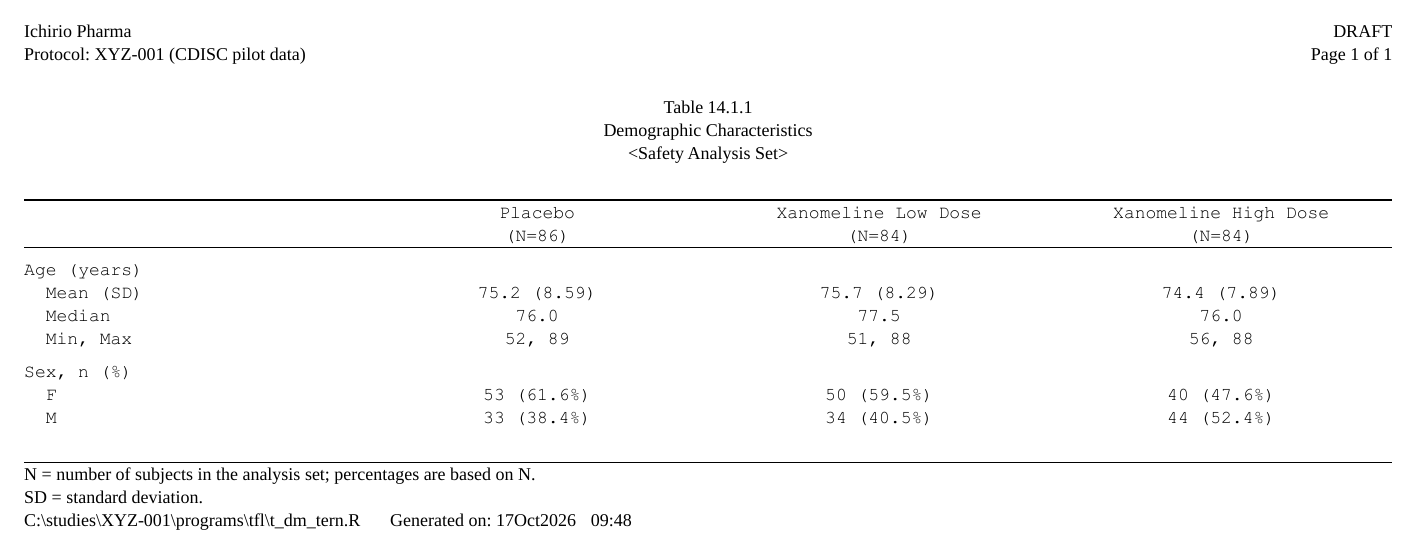
An rtables / tern table
library(tern)

adsl$SEX <- factor(adsl$SEX)
lyt <- basic_table(show_colcounts = TRUE) |>
  split_cols_by("ARM") |>
  analyze_vars(c("AGE", "SEX"), var_labels = c(AGE = "Age (years)", SEX = "Sex, n (%)"),
               .stats   = c("mean_sd", "median", "range", "count_fraction"),
               .labels  = c(mean_sd = "Mean (SD)", median = "Median", range = "Min, Max"),
               .formats = c(mean_sd = "xx.x (xx.xx)", median = "xx.x", range = "xx, xx",
                            count_fraction = "xx (xx.x%)"))

rtf_document(
  program = "/studies/XYZ-001/programs/tfl/t_dm_tern.R",
  tokens  = list(STUDY = "XYZ-001")) |>
  rtf_section(
    header = rtf_header(list(
      c(l = "Ichirio Pharma",                      r = "DRAFT"),
      c(l = "Protocol: {STUDY} (CDISC pilot data)", r = "Page {PAGE} of {TOTAL_PAGES}"),
      c(c = ""),
      c(c = "Table 14.1.1"),
      c(c = "Demographic Characteristics"),
      c(c = "<Safety Analysis Set>"))),
    footer = rtf_footer(list(
      c(l = "N = number of subjects in the analysis set; percentages are based on N."),
      c(l = "SD = standard deviation."),
      c(l = "{PROGRAM_FULL}    Generated on: {DATETIME}")))) |>
  rtf_tables(as_rtftables(build_table(lyt, df = adsl))) |>
  generate_rtfreport("t_dm_tern.rtf")
A gtsummary table
library(gtsummary)

tbl <- tbl_summary(adsl, by = ARM, include = c(AGE, SEX),
                   type      = AGE ~ "continuous2",
                   statistic = list(AGE ~ c("{mean} ({sd})", "{median}", "{min}, {max}"),
                                    SEX ~ "{n} ({p}%)"),
                   digits    = list(AGE ~ c(1, 2, 1, 0, 0), SEX ~ c(0, 1)),
                   label     = list(AGE ~ "Age (years)", SEX ~ "Sex")) |>
  add_stat_label(label = list(AGE ~ c("Mean (SD)", "Median", "Min, Max"), SEX ~ "n (%)")) |>
  modify_header(label ~ "", all_stat_cols() ~ "{level}\n(N={n})") |>
  remove_footnote_header(columns = all_stat_cols())

rtf_document(
  program = "/studies/XYZ-001/programs/tfl/t_dm_gtsummary.R",
  tokens  = list(STUDY = "XYZ-001")) |>
  rtf_section(
    header = rtf_header(list(
      c(l = "Ichirio Pharma",                      r = "DRAFT"),
      c(l = "Protocol: {STUDY} (CDISC pilot data)", r = "Page {PAGE} of {TOTAL_PAGES}"),
      c(c = ""),
      c(c = "Table 14.1.1"),
      c(c = "Demographic Characteristics"),
      c(c = "<Safety Analysis Set>"))),
    footer = rtf_footer(list(
      c(l = "N = number of subjects in the analysis set; percentages are based on N."),
      c(l = "SD = standard deviation."),
      c(l = "{PROGRAM_FULL}    Generated on: {DATETIME}")))) |>
  rtf_tables(as_rtftables(tbl)) |>
  generate_rtfreport("t_dm_gtsummary.rtf")
The same table again, its labels and headers set in gtsummary (the page it writes). gt, tfrmt, flextable and huxtable tables, rlistings listings and plain data frames go in the same way: see Importing tables and the same report, every framework articles for Demographics and Adverse events.

Writing rtfreporter code with an AI assistant
rtfreporter is too new to be in any chat model’s training data: asked for rtfreporter code it reaches for r2rtf’s verbs or invents arguments, and flags neither as a guess. Give it the facts first.
The manuals ship with the package, so the one you attach describes the version you actually have:
rtfreporter_ai_manual()                     # path to the user manual
rtfreporter_ai_manual("ai-kit", ard = ard)  # a folder to attach: the request, the manual,
                                            # three example programs, your ARD and its shape
Or download it – AI user manual (v0.8.2) – one self-contained file sized for a single chat session. Attach it at the start of the session and say “use this manual”. ai/rtfreporter-ai-user-manual.md always resolves to the newest release, so it is safe to bookmark; the development copy is published beside it under its own version.
Every example in it is run by CI and its function list is checked against NAMESPACE, so a manual that drifts from the API fails the build.
Working on rtfreporter rather than with it? See Developing with an AI assistant, which covers the companion developer manual (rtfreporter_ai_manual(which = "dev")).
A focused tool, on purpose
rtfreporter is a focused tool for the one clinical TFL layout, not a general-purpose RTF library. What that buys you:
- One output style, opinionated defaults. No theme zoo, no “render anything” pipeline. The defaults match the conventional clinical TFL look out of the box; you do not have to assemble it.
-
Only the features TFL → RTF needs. Multi-section headers / footers, spanning column headers, automatic page-number fields (
{PAGE}/{TOTAL_PAGES}), embedded figures, and per-document concatenation viaassemble_rtf(). If a feature would not appear on a real clinical TFL, we resist adding it. - Maintainability over breadth. Saying no to scope creep is what keeps the package small, the tests fast, and the API stable.
-
Composable pipe API.
rtf_document() |> rtf_section() |> rtf_tables() |> generate_rtfreport()— the same vocabulary every time, so building a 50-TFL deliverable is a loop.
If your deliverables need a substantially different layout, another tool may serve you better — and that trade-off is intentional. We would rather do one well-defined style really well than do everything passably. You are warmly welcome to use rtfreporter for the styles it supports.
Why RTF?
RTF is an old format, and we are perfectly aware of that. Producing .docx directly, or rendering straight to PDF, is entirely possible and in some respects more modern. We chose RTF on purpose, for the most old-fashioned of reasons: it is the simplest thing that fully meets the need.
For clinical deliverables the workflow we care about is RTF → (optional post-processing) → PDF, and that route is still genuinely useful today:
- Simple grammar. RTF is plain text with a small, well-understood command vocabulary. That keeps the renderer small and auditable — which matters in a regulated setting.
- Easy to patch when you must. Because the output is just text, a last-minute correction can be made by hand or by a small script, without round-tripping through a binary editor.
- Universally openable. Every word processor opens RTF and exports it to PDF, so the final step fits whatever your organisation already uses.
A PDF-first or DOCX-first toolkit could do the same job, perhaps more elegantly or with more features. But for our needs — which are modest, specific, and well-defined — RTF remains the easiest path that is necessary and sufficient. Simplicity, here, is the feature.
Documentation
The full pkgdown site is at https://ichirio.github.io/rtfreporter/:
- Gallery — tables, a listing and figures from the CDISC pilot data, each with the code that wrote it
-
Get started — from an ARD to the RTF file (
vignette("rtfreporter")) -
Tables from an ARD (recommended) — cards / cardx to RTF, step by step, the plan verbs and from
as_rtftables()to a plan -
Bring your own table — gt / gtsummary / rtables / tfrmt / flextable / huxtable objects and data frames through
as_rtftables(), pagination, and the same report, every framework articles (Demographics, Adverse events) - Listings — from the records or from source data, including the column-width estimator and the wrapping rule
- Figures — a plot object to a page
- Assembling a deliverable — headers, footers and tokens, borders and rules, and joining files with a table of contents
- Architecture & internals — the object model, the public classes and the rendering pipeline
Status
Pre-1.0 (lifecycle: experimental): the latest release is v0.8.2, and development continues on main – see NEWS.md; the roadmap is in the site’s sidebar.
Citation
If rtfreporter helps your work, please cite it:
citation("rtfreporter")If the numbers in your tables come from a cards / cardx ARD, please cite those packages too (citation("cards"), citation("cardx")): they compute the statistics; rtfreporter only lays them out.
Acknowledgements
rtfreporter stands on the work of many others, and we are grateful to their authors.
-
cards and cardx — the analysis results data (ARD) that
normalize_ard()and theplan_*()verbs read are their design, an outcome of the pharmaverse community’s work on analysis results data. -
The table builders
as_rtftables()reads — gt, gtsummary, tfrmt, rtables / rlistings / tern, flextable and huxtable. rtfreporter reads the objects they build; the tables themselves are their work. - pharmaverseadam and the pharmaverse examples — the ADaM data (from the CDISC pilot study) and the example tables behind many of our examples and articles.
rtfreporter is an independent project and is not affiliated with, or endorsed by, the authors of these packages.
Contributing & bug reports
Issues and pull requests are very welcome at https://github.com/ichirio/rtfreporter. Please read CONTRIBUTING.md and the code of conduct first.
License
Apache License 2.0 © 2026 Yoichi Masui. See LICENSE.md.