
Tables from data frames: a feature tour
Source:vignettes/rtfreporter-quickstart.Rmd
rtfreporter-quickstart.RmdOverview
This is a tour of what rtftable() and the document verbs
can do with a table you already have as a data frame – the bring
your own table path. When the statistics are in an analysis
results dataset (cards / cardx), the recommended route is a table plan
instead: start with Get started and Tables from an ARD.
Core workflow:
rtf_document() |>
  rtf_section(page = 1, header = ..., footer = ...) |>
  rtf_tables(list(tbl1, tbl2)) |>
  generate_rtfreport("output.rtf", overwrite = TRUE)
1 Minimal one-page report
Show code
library(rtfreporter)

df <- data.frame(
  Subject = c("001", "002", "003"),
  Arm     = c("Active", "Placebo", "Active"),
  Age     = c(34L, 45L, 28L),
  Sex     = c("M", "F", "M"),
  stringsAsFactors = FALSE
)

doc <- rtf_document() |>
  rtf_section(page = 1,
    header = rtf_header(rows = list(
      c(l = "Protocol: RTF-101",         r = "ACME Pharma"),
      c(l = "Table 14.1.1 Demographics", r = "Page {AUTO_PAGE} of {AUTO_TOTAL_PAGES}")
    )),
    footer = rtf_footer(rows = list(
      c(l = "Source: DM domain.", r = "CONFIDENTIAL")
    ))) |>
  rtf_tables(list(
    rtftable(df,
      col_rel_width    = c(2, 2, 1, 1),
      row_height_twips = 280L)
  ))

generate_rtfreport(doc, tempfile(fileext = ".rtf"), overwrite = TRUE)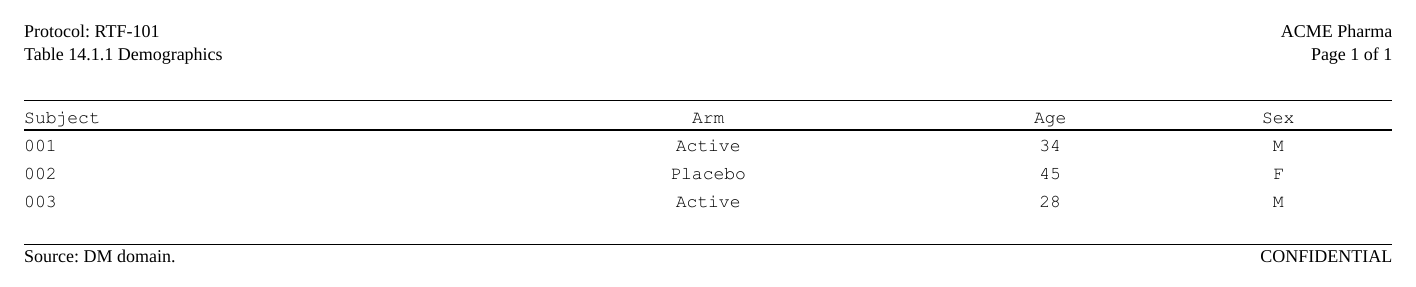
2 Lab shift table — one section per analyte
Each analyte occupies its own RTF section so the analyte name appears in the section header, changing from page to page.
Show code
make_shift_df <- function(a_low, a_norm, a_high, b_low, b_norm, b_high) {
  data.frame(
    Baseline = c("Low", "Normal", "High"),
    A_Low    = a_low,  A_Normal = a_norm,  A_High = a_high,
    B_Low    = b_low,  B_Normal = b_norm,  B_High = b_high,
    stringsAsFactors = FALSE, check.names = FALSE
  )
}

lab_data <- list(
  list(label = "ALT (Alanine Aminotransferase)",
       df    = make_shift_df(c(4,0,0), c(1,13,1), c(0,2,3),
                             c(3,0,0), c(1,14,0), c(0,1,4))),
  list(label = "AST (Aspartate Aminotransferase)",
       df    = make_shift_df(c(5,0,0), c(0,11,2), c(0,1,5),
                             c(4,0,0), c(1,12,1), c(0,2,4))),
  list(label = "HGB (Hemoglobin)",
       df    = make_shift_df(c(2,1,0), c(1,16,1), c(0,1,2),
                             c(3,0,0), c(0,15,2), c(0,2,2)))
)

spanning_hdr <- list(
  list(from = 2L, to = 4L, label = "Treatment A  (N=24)", underline = TRUE),
  list(from = 5L, to = 7L, label = "Treatment B  (N=24)", underline = TRUE)
)
col_hdr    <- c("Baseline", "Low", "Normal", "High", "Low", "Normal", "High")
col_widths <- c(2160L, 900L, 900L, 900L, 900L, 900L, 900L)

col_spec_shift <- lapply(seq_len(7L), function(j)
  list(col = j, align = if (j == 1L) "left" else "center"))

common_footer <- rtf_footer(
  rows = list(
    c(l = "ALT=Alanine Aminotransferase; AST=Aspartate Aminotransferase; HGB=Hemoglobin"),
    c(l = "Low/Normal/High: site reference range categories.", r = "CONFIDENTIAL")
  )
)

# Build document: one section per analyte
doc <- rtf_document()

for (i in seq_along(lab_data)) {
  item <- lab_data[[i]]

  tbl <- rtftable(
    data                = item$df,
    col_header          = list(spanning_hdr, col_hdr),   # rows top first
    col_spec            = col_spec_shift,
    column_widths_twips = col_widths,
    border              = "tfl",
    row_height_twips    = 280L
  )

  sec_header <- rtf_header(rows = list(
    c(l = "Protocol: LAB-001",                             r = "ACME Pharma"),
    c(l = "Study Title: Phase III Safety Lab Assessment",   r = "Page {AUTO_PAGE} of {AUTO_TOTAL_PAGES}"),
    c(c = "Table 14.3.1  Laboratory Shift Table (Safety Population)"),
    c(l = item$label)
  ))

  doc <- doc |>
    rtf_section(page = i, header = sec_header, footer = common_footer) |>
    rtf_tables(list(tbl))
}

generate_rtfreport(doc, tempfile(fileext = ".rtf"), overwrite = TRUE)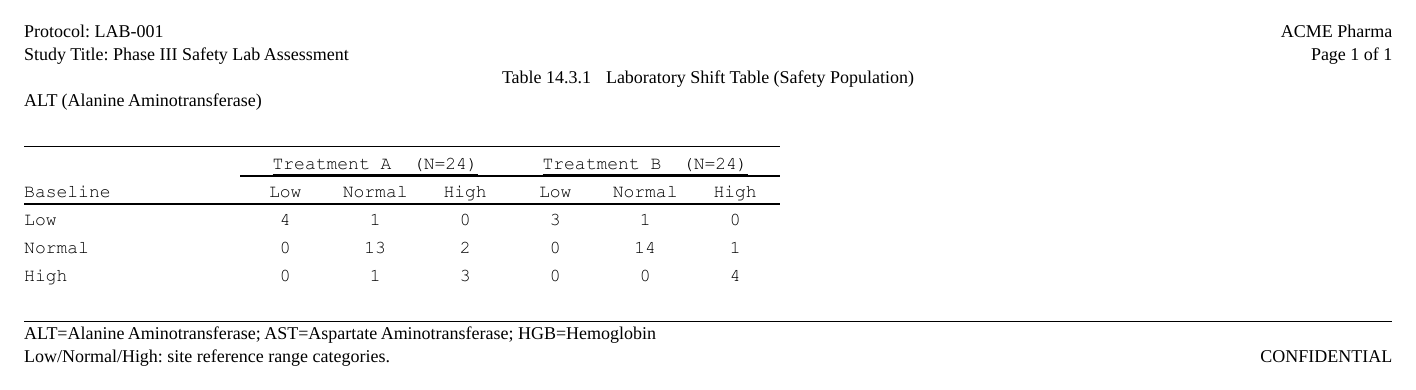
3 Embedding figures (ggplot2)
Show code
library(ggplot2)

p <- ggplot(
  data.frame(x = 1:10, y = (1:10)^2 + rnorm(10, sd = 3)),
  aes(x = x, y = y)) +
  geom_point(size = 3, colour = "#2166AC") +
  geom_smooth(method = "lm", se = FALSE, colour = "#D6604D") +
  labs(title = "Lab value vs. Visit (simulated)", x = "Visit", y = "Lab value") +
  theme_bw(base_size = 11)

png_path <- tempfile(fileext = ".png")
ggsave(png_path, plot = p, width = 7, height = 4.5, dpi = 150)

doc <- rtf_document() |>
  rtf_section(page = 1,
    header = rtf_header(rows = list(
      c(l = "Protocol: FIG-001",           r = "ACME Pharma"),
      c(l = "Figure 14.1.1  Lab Value vs. Visit (Safety Population)")
    )),
    footer = rtf_footer(rows = list(c(l = "Source: LB domain.")))) |>
  rtf_tables(list(
    rtfplot(png_path, width_twips = 9000L)
  ))

generate_rtfreport(doc, tempfile(fileext = ".rtf"), overwrite = TRUE)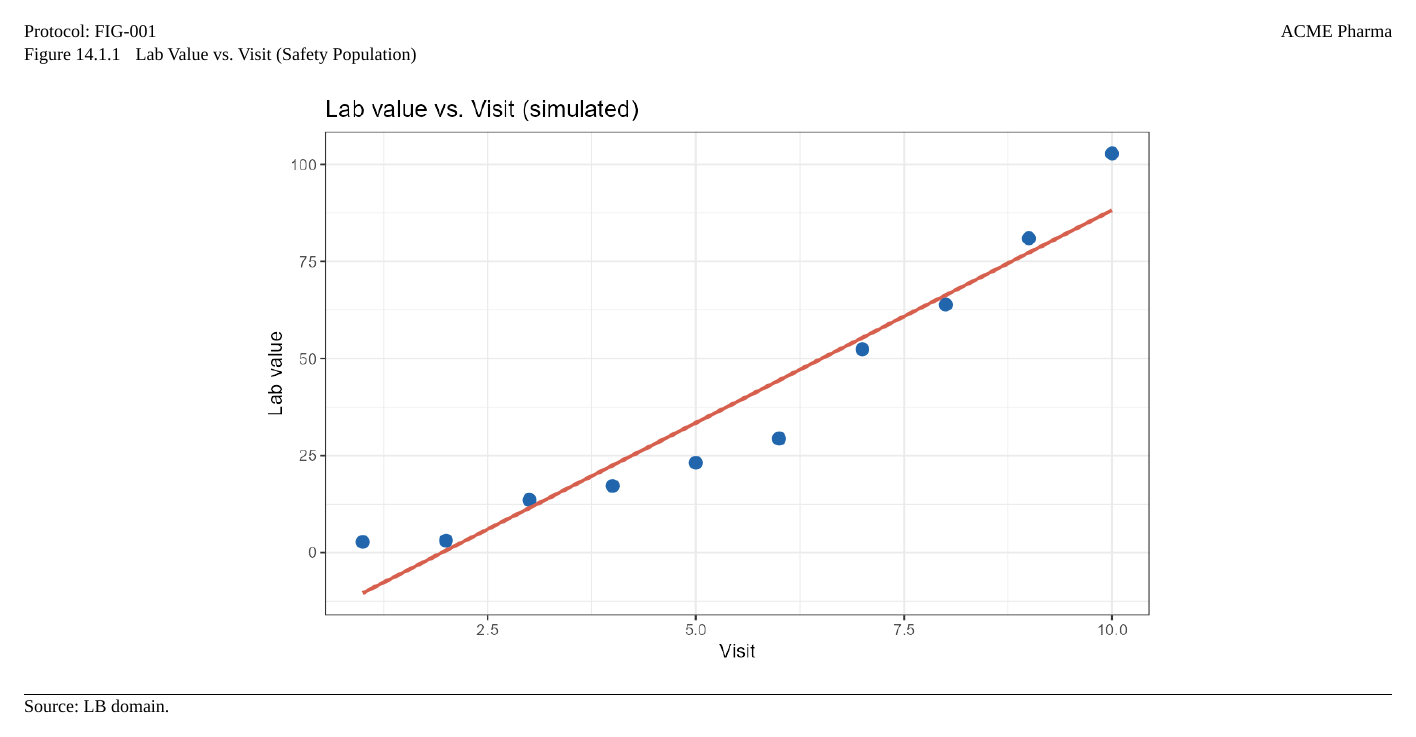
4 Figure and summary on consecutive pages
Each page holds exactly one content item (one table or one figure). To present a figure together with a summary table, place them on adjacent pages — both can share the same section header.
Show code
tbl_summary <- rtftable(
  data.frame(
    Statistic = c("n", "Mean", "SD"),
    Value     = c("30", "42.7", "8.4"),
    stringsAsFactors = FALSE
  ),
  table_width_pct  = 40,
  table_align      = "left",
  row_height_twips = 280L
)

doc <- rtf_document() |>
  rtf_section(page = 1,
    header = rtf_header(rows = list(
      c(l = "Protocol: FIG-001", r = "ACME Pharma"),
      c(l = "Figure and Summary Table")
    )),
    footer = rtf_footer(rows = list(c(l = "Source: LB domain.", r = "CONFIDENTIAL")))) |>
  rtf_tables(list(
    rtfplot(png_path, width_twips = 7200L),  # page 1: figure
    tbl_summary                              # page 2: summary table
  ))

generate_rtfreport(doc, tempfile(fileext = ".rtf"), overwrite = TRUE)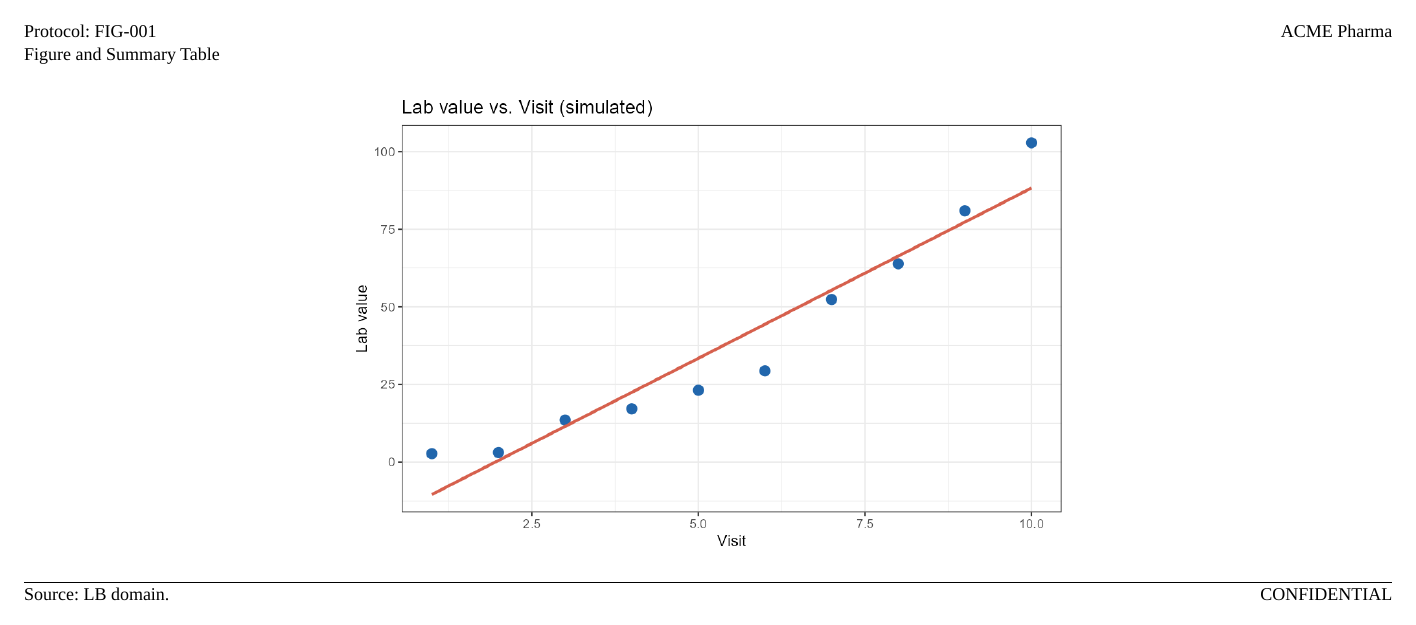
5 Table width and alignment
| Parameter | Description |
|---|---|
table_width_pct = 70 |
70 % of writable page width |
table_width_twips = 9000L |
Absolute: 9000 twips ≈ 6.25 in |
table_align = "center" |
Center the table on the page |
table_align = "right" |
Right-align the table |
Show code
df <- data.frame(A = 1:3, B = letters[1:3], C = c(1.1, 2.2, 3.3))

tbl_left   <- rtftable(df, table_width_pct = 70)
tbl_center <- rtftable(df, table_width_twips = 9000L, table_align = "center")
tbl_right  <- rtftable(df, table_width_twips = 7200L, table_align = "right",
                        col_rel_width = c(3, 1, 1))
tbl_full   <- rtftable(df, table_width_pct = 100)
6 Column width control
| Method | Parameter | Notes |
|---|---|---|
| Absolute | column_widths_twips = c(2880L, 1440L, 1440L) |
One value per column |
| Relative | col_rel_width = c(2, 1, 1) |
Proportional split |
| Auto | auto_col_widths(df) |
Font-aware estimation |
Show code

7 Header / footer layout
Show code
# Multi-row header
sec_header <- rtf_header(rows = list(
  c(l = "Protocol: RTF-101",     r = "ACME Pharma"),
  c(l = "Phase III Safety Study", r = "Page {AUTO_PAGE} of {AUTO_TOTAL_PAGES}"),
  c(c = "Table 14.3.1  Shift Table (Safety Population)"),
  c(l = "ALT (Alanine Aminotransferase)")
))

# Footer with two rows
sec_footer <- rtf_footer(rows = list(
  c(l = "ALT=Alanine Aminotransferase", r = "CONFIDENTIAL"),
  c(l = "Low/Normal/High: site reference range categories.")
))
8 Page tokens
| Token | Behaviour |
|---|---|
{AUTO_PAGE} |
Dynamic page number (\chpgn) |
{AUTO_TOTAL_PAGES} |
Dynamic NUMPAGES field — recommended |
{TOTAL_PAGES} |
Static total computed at render time |
{BOOK_PAGE} |
A slot left empty here, filled by
assemble_rtf(book_page =)
|
Two numbers, two jobs. The per-table number belongs
in the header and must be static, so that binding the table into a
compiled document does not change it:
"Page {PAGE} of {TOTAL_PAGES}" — within one generated file
these count that file’s table, and assemble_rtf() leaves
them alone. The document-wide number belongs in the
footer and must be dynamic, because only the reader knows it:
"Page {AUTO_PAGE} of {AUTO_TOTAL_PAGES}".
For a single standalone table,
"Page {AUTO_PAGE} of {AUTO_TOTAL_PAGES}" alone is enough —
the document is the table.
Both numbers on one page
Writing both from the start works, but on a standalone deliverable
they are the same number, so it prints twice. {BOOK_PAGE}
reserves the position instead:
# the deliverable -- the slot renders empty, keeping the row's height
footer = rtf_footer(rows = list(
  c(c = "Company Confidential"),
  c(l = "Statistical Programming", r = "Draft"),
  c(c = "{BOOK_PAGE}")))

# the book
assemble_rtf(files, "book.rtf",
             book_page = "Page {AUTO_PAGE} of {AUTO_TOTAL_PAGES}")
Standalone, the header reads Page 1 of 3 and that footer
row is blank. In the book the same page reads Page 1 of 3
at the top and Page 2 of 6 at the bottom — and because the
row was already there at its full height, filling it cannot move
anything. The other footer rows are untouched; each deliverable keeps
its own footer.
The slot may sit in any band — header, footer, title or footnote — and there is no addressing to learn: wherever you write the token is where the number goes.
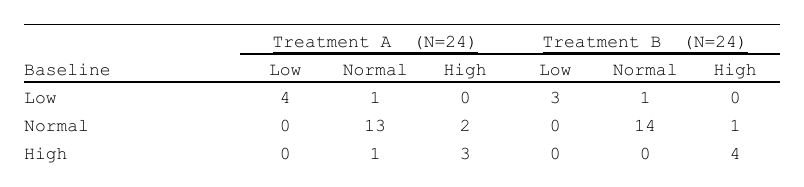
9 Spanning headers
Show code
df_shift <- data.frame(
  Baseline = c("Low", "Normal", "High"),
  A_Low = c(4L, 0L, 0L), A_Norm = c(1L, 13L, 1L), A_High = c(0L, 2L, 3L),
  B_Low = c(3L, 0L, 0L), B_Norm = c(1L, 14L, 0L), B_High = c(0L, 1L, 4L)
)

tbl_span <- rtftable(
  data = df_shift,
  col_header = list(                     # rows top first
    list(list(from = 2L, to = 4L, label = "Treatment A  (N=24)", underline = TRUE),
         list(from = 5L, to = 7L, label = "Treatment B  (N=24)", underline = TRUE)),
    c("Baseline", "Low", "Normal", "High", "Low", "Normal", "High")
  ),
  column_widths_twips = c(2160L, 900L, 900L, 900L, 900L, 900L, 900L),
  col_spec = lapply(seq_len(7L), function(j)
    list(col = j, align = if (j == 1L) "left" else "center")),
  border           = "tfl",
  row_height_twips = 280L
)
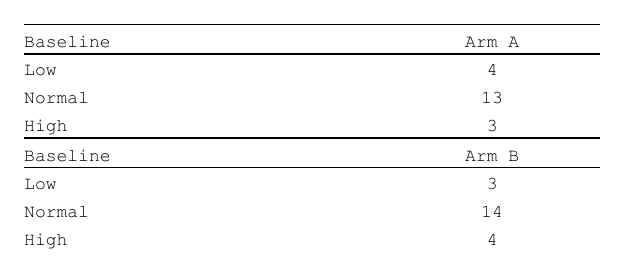
10 Multi data.frame table
Show code
df_a <- data.frame(Label = c("Low", "Normal", "High"), n = c(4L, 13L, 3L))
df_b <- data.frame(Label = c("Low", "Normal", "High"), n = c(3L, 14L, 4L))

tbl_multi <- rtftable(
  data       = list(df_a, df_b),
  col_header = list(
    c("Baseline", "Arm A"),
    c("Baseline", "Arm B")
  ),
  column_widths_twips = c(3600L, 2160L),
  border              = "tfl",
  row_height_twips    = 280L
)
11 Border customization
Show code
tbl_tfl <- rtftable(df, border = "tfl")

# A border applies to whatever you attach it to.  Here: the whole table.
tbl_framed <- rtftable(df,
  border = rtf_border(top = TRUE, bottom = TRUE,
                      left = TRUE, right = TRUE,
                      inside_h = TRUE)
)

# Or one kind of row at a time.
tbl_custom <- rtftable(df, border = "none") |>
  style_zone(
    header   = rtf_border(top = TRUE, bottom = TRUE),
    last_row = rtf_border(bottom = rtf_border_line("double", 10L))
  )

hdr_bordered <- rtf_header(
  rows   = list(c(c = "Study Title")),
  border = rtf_border(bottom = TRUE)
)
12 Assembling multiple RTF files
Show code
make_rtf <- function(df, hdr_text, path) {
  doc <- rtf_document() |>
    rtf_section(page = 1,
      header = rtf_header(rows = list(
        c(l = hdr_text, r = "Page {AUTO_PAGE} of {AUTO_TOTAL_PAGES}")
      )),
      footer = rtf_footer(rows = list(c(l = "CONFIDENTIAL")))) |>
    rtf_tables(list(df))
  generate_rtfreport(doc, path, overwrite = TRUE)
}

f1 <- tempfile(fileext = ".rtf"); make_rtf(mtcars[1:3, ], "Table 14.1 DM", f1)
f2 <- tempfile(fileext = ".rtf"); make_rtf(mtcars[4:6, ], "Table 14.2 AE", f2)

assembled <- tempfile(fileext = ".rtf")
assemble_rtf(c(f1, f2), assembled, overwrite = TRUE)
13 Auto column widths
Show code
df_ae <- data.frame(
  USUBJID  = c("001-001", "001-002"),
  AETERM   = c("Headache", "Nausea"),
  AESTDTC  = c("2024-01-15", "2024-02-03"),
  AESER    = c("N", "N"),
  stringsAsFactors = FALSE
)

w <- auto_col_widths(df_ae,
  col_header        = "Subject ID | AE Term | Start Date | Serious",
  table_width_twips = 14400L)

tbl_ae <- rtftable(df_ae,
  col_header          = c("Subject ID", "AE Term", "Start Date", "Serious"),
  column_widths_twips = w,
  border              = "tfl",
  row_height_twips    = 280L)
14 Blank separator rows
blank_rows accepts three combinable spec modes — integer
positions, variable-change detection, and regex rule. Combine them in a
list() and the positions are unioned.
Show code
df_demog <- data.frame(
  Group    = c("Sex",    "Sex",     "Sex",
                "Race",   "Race",    "Race",
                "Total"),
  Category = c("Male",   "Female",  "Subtotal",
                "Asian",  "Other",   "Subtotal",
                ""),
  N        = c(45L, 35L, 80L, 40L, 40L, 80L, 80L),
  stringsAsFactors = FALSE
)

# Mode 1: integer positions (-1 = after the last row)
tbl1 <- rtftable(df_demog, blank_rows = c(0, 3, 6, -1))

# Mode 2: blank when a variable's value changes
tbl2 <- rtftable(df_demog,
  blank_rows = blank_rows_by_change("Group",
    include_before_first = FALSE, include_after_last = FALSE))

# Mode 3: regex match (e.g. before every "Total" row)
tbl3 <- rtftable(df_demog,
  blank_rows = blank_rows_by_rule("Group", "^Total", where = "before"))

# Combination — positions are unioned
tbl4 <- rtftable(df_demog,
  blank_rows = list(
    c(-1),
    blank_rows_by_change("Group",
      include_before_first = FALSE, include_after_last = FALSE),
    blank_rows_by_rule("Category", "^Subtotal", where = "after")
  ))

# Or attach an attribute to the data frame and let read_attributes pick it up
attr(df_demog, "rtf_blank_rows") <- c(0, 3, 6, -1)
tbl5 <- rtftable(df_demog)   # read_attributes = TRUE by default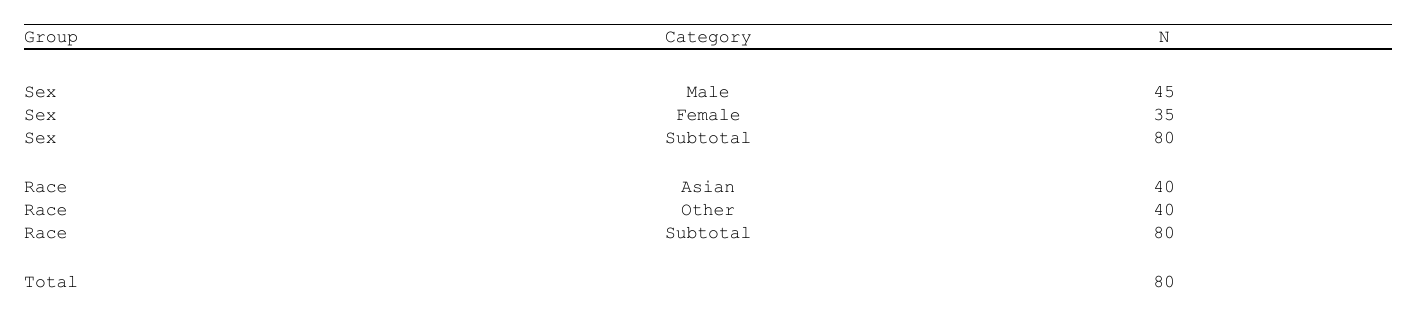
15 Titles & footnotes per page
rtf_tables() and rtf_figures() accept
parallel titles and footnotes lists — one
entry per page, each a character vector whose elements become individual
paragraph lines. "" produces a blank line;
NULL falls back to the package defaults (title = one blank
centred line; no footnote).
Show code
doc <- rtf_document() |>
  rtf_tables(
    list(df_demog, df_demog),
    titles = list(
      c("Table 14.1.1", "", "Demographics (Safety Population)"),
      c("Table 14.1.2", "", "Demographics by Region")
    ),
    footnotes = list(
      c("Source: ADSL.", "", "N = 160 subjects."),
      NULL
    )
  )

# Or set them after content has been added
doc <- rtf_document() |>
  rtf_tables(list(df_demog, df_demog)) |>
  rtf_titles(list("Page One", "Page Two")) |>
  rtf_footnotes(list(NULL, "Source: ADSL."))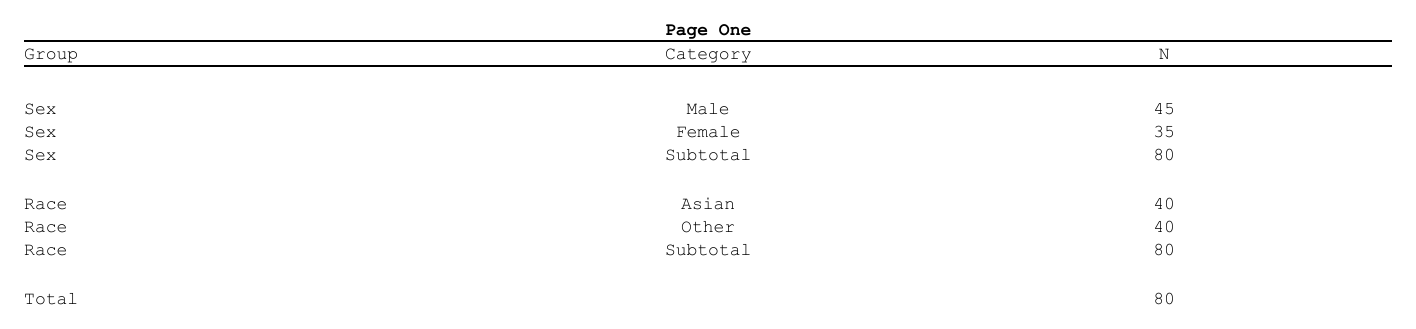
Titles render as centred bold paragraphs; footnotes render as left-aligned paragraphs with a top divider line on the first line. Both inherit the document font size (one font per document, 9 pt by default).
16 Shared table style
rtf_table_style() builds a table-style
record that bundles default borders, alignment, padding and
row-height. Pass the same record to many rtftable() calls
and each table snapshots the defaults it needs at construction time. To
derive a variant, call rtf_table_style_with().
Show code
tfl <- rtf_table_style_tfl()   # built-in TFL preset

# Hand the same record to many tables
tables <- lapply(list(df_demog, df_demog, df_demog),
                  function(df) rtftable(df, style = tfl, row_height_twips = 280L))

# Non-mutating derivation
heavy_tfl <- rtf_table_style_with(tfl,
  border_last_row = rtf_border(bottom = rtf_border_line("double", 20L))
)
The S3 architecture is documented in LEARNING.md
in the GitHub repository.
Quick-reference
rtftable parameters
| Parameter | Type | Purpose |
|---|---|---|
data |
data.frame or list | Content rows |
col_header |
chr / list | Column header text; a list holds several rows, spanning rows first |
col_header_align |
NULL / scalar / chr(ncol) | Column-header alignment override (default: inherit
align) |
col_spec |
list | Per-column align / bold / italic / indent / border
(rtf_border) / header_* |
border |
"tfl" / object |
Outer-frame borders (now: top on first header row, bottom on last) |
blank_rows |
int / spec / list | Integer positions, blank_rows_by_change(),
blank_rows_by_rule(), or a list thereof |
read_attributes |
logical | Read attr(data, "rtf_blank_rows") as fallback (default
TRUE) |
style |
rtf_table_style | Shared S3 theme record; provides defaults overridden by explicit args |
col_rel_width |
numeric vector | Proportional column widths |
column_widths_twips |
integer vector | Absolute column widths |
table_width_twips |
integer | Table total width (twips) |
table_width_pct |
numeric 0-100 | Table width as % of page |
table_align |
"left" / "center" /
"right"
|
Table position on page |
row_height_twips |
integer / NULL | Data row height; NULL = font-aware default |
rtf_tables / rtf_figures pipe-API extras
| Parameter | Type | Purpose |
|---|---|---|
titles |
list of chr | One entry per page; each char vector = one paragraph per line
("" = blank) |
footnotes |
list of chr | Same shape as titles; first line carries the top
divider |
All rtftable() formatting args |
— | Applied to bare data.frame items in the list |
Where next
- Get started — the recommended ARD + plan workflow
-
Importing tables — gt,
gtsummary, rtables, tfrmt, flextable and huxtable through
as_rtftables() - Page setup — paper size, orientation, margins
- Output options — where the file goes and what it contains
The four recipes (?rtfreporter-recipes) are the same
ground covered as runnable help-page examples: demographics, adverse
events, PK and laboratory, each data-in to RTF-out.