
A rtfreporter document is a flat sequence of content pages (see Adding tables and figures). The running header and footer – the lines repeated at the top and bottom of every page – are not attached to individual pages. Instead they are defined by sections.
The model: sections overlay headers/footers onto page ranges
A section assigns a header and footer starting at a
given page; that header/footer applies to every page from there
until the next section. There is no separate “per-page header”
mechanism – a single page’’s header is simply whatever the section
covering that page defines. You create sections with
rtf_section(doc, page = , header = , footer = ).
Two consequences worth remembering:
- Passing
header = NULL(orfooter = NULL) for a section means inherit the previous section’’s header (footer) – not “blank”. - Sections are an overlay on the flat page list; they do not contain or group the content. Content order alone determines page numbers.
Building a header or footer
rtf_header() / rtf_footer() build the
header/footer content. Rows are named character vectors using
l / c / r for the left / centre /
right cell; pass a list of them for a multi-row header.
Page-number tokens are filled in for you (the tokens
section below lists them all):
-
{PAGE}/{TOTAL_PAGES}– the page number and page count, written into the file; -
{AUTO_PAGE}/{AUTO_TOTAL_PAGES}– the same as RTF fields the word processor computes, so they stay right afterassemble_rtf()joins files.
Show code
hdr <- rtf_header(rows = list(
  c(l = "Protocol XYZ-001", r = "Confidential"),
  c(l = "Table 14.1.1",     r = "Page {AUTO_PAGE} of {AUTO_TOTAL_PAGES}")
))
ftr <- rtf_footer(c(c = "ACME Pharma, Inc."))
The rows are a plain list, so a row that depends on logic is added (or replaced) with R and the header made again:
Show code
rows <- list(
  c(l = "Protocol XYZ-001", r = "Confidential"),
  c(l = "Table 14.1.1",     r = "Page {AUTO_PAGE} of {AUTO_TOTAL_PAGES}")
)
rows[[3]] <- c(c = "DRAFT")
hdr <- rtf_header(rows = rows)
A header/footer can also take a border (e.g. a rule
under the footer) – see ?rtf_header.
One header/footer for the whole document
For a single running header/footer, define one section starting at page 1:
Show code
df <- data.frame(A = c("1", "2"), B = c("x", "y"), stringsAsFactors = FALSE)

doc <- rtf_document() |>
  rtf_tables(list(df, df, df)) |>                      # three pages
  rtf_section(page = 1, header = hdr, footer = ftr)
The section at page 1 covers all subsequent pages, so every page gets the same header and footer.
Different headers/footers for different page ranges
Define more sections, each starting where its header/footer should take over. Here pages 1-2 use one header and pages 3+ use another:
Show code
hdr_b <- rtf_header(rows = list(c(l = "Protocol XYZ-001", r = "Table 14.2.1")))

doc <- rtf_document() |>
  rtf_tables(list(df, df, df, df)) |>
  rtf_section(page = 1, header = hdr,   footer = ftr) |>
  rtf_section(page = 3, header = hdr_b, footer = NULL)
#                                                       ^ NULL = keep ftr
footer = NULL on the second section inherits the first
section’’s footer, so only the header changes at page 3. You can also
assign several sections in one call by passing a vector of
pages and a list of secinfo objects – see
?rtf_section.
Per-content automatic headers – auto_section
When each table should start its own section with a heading derived
from its name, use auto_section = TRUE with a
named list of content. Define the common header once
with rtf_section() without a page
(the base template), and each name is appended to it as a per-section
line:
Show code
doc <- rtf_document() |>
  rtf_section(header = hdr, footer = ftr) |>   # base (no page)
  rtf_tables(
    list("Demographics" = df, "Adverse events" = df),
    auto_section        = TRUE,
    section_label_align = "center"
  )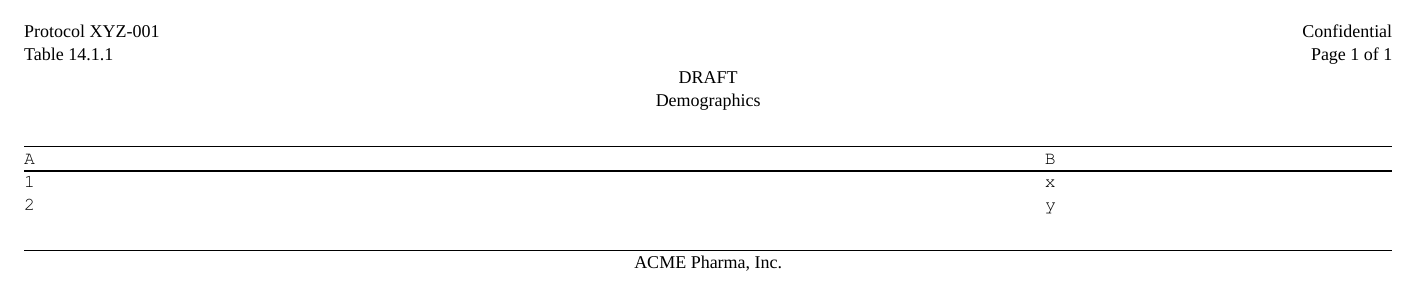
This splits the document into one section per named item, each
carrying the base header plus its own label – a compact way to get
per-table headings without writing a rtf_section() call for
every table. auto_section is sugar built on the same
section mechanism described above.
Sectioning converted (multi-page) tables
auto_section reads the list names: a
non-empty name starts a new section (its text goes in the header), and
an empty / unnamed element falls through into the current section. The
example above works because each item is a single table. But
as_rtftables() returns one element per
page, so a paginated table is already a list – naming the whole
list once is not enough, and naming every page would start a
fresh section on each page.
Two ways to get clean sections from converted tables:
-
Group is a real column (a
data.frame/ Tplyr body you assemble, or acards+tfrmttable withlabel_loc = "column"): letas_rtftables()do it.split = "by_value"names each page by the group value, soauto_section = TRUEgives one section per group with no extra step:Show code
pages <- as_rtftables(lab_df, split = "by_value", group_col = "PARAM", drop_cols = "PARAM") doc <- rtf_document() |> rtf_section(header = hdr) |> rtf_tables(pages, auto_section = TRUE) # one section per parameter -
Group is row-grouped (gt, gtsummary, rtables/tern, or
tfrmtindented – the group is rendered as label rows, not a column), or you are combining several distinct tables: use [combine_sections()]. Each argument’s name becomes one section, applied to that argument’s first page with the remaining pages falling through:Show code
dm <- as_rtftables(dm_gt)                         # may be several pages
ae <- as_rtftables(ae_tbl, split = "group_force", max_rows = 30)

doc <- rtf_document() |>
  rtf_section(header = hdr) |>
  rtf_tables(
    combine_sections(Demographics = dm, `Adverse Events` = ae),
    auto_section = TRUE)                          # one clean section per table
Leaving the pages named one-per-page is also fine – it simply yields
one RTF section per page, which is harmless (it matches the common
one-page-one-section convention). combine_sections() is
just for the tidier one-section-per-table layout.
Page numbering
The tokens render to dynamic RTF fields, so the page numbers are correct in the word processor even after the document is re-paginated:
Show code
doc <- rtf_document() |>
  rtf_tables(list(df, df)) |>
  rtf_section(page = 1,
    header = NULL,
    footer = rtf_footer(c(c = "Page {AUTO_PAGE} of {AUTO_TOTAL_PAGES}")))

rtf <- {
  f <- tempfile(fileext = ".rtf"); generate_rtfreport(doc, f, overwrite = TRUE)
  paste(readLines(f, warn = FALSE), collapse = "\n")
}
grepl("\\chpgn", rtf, fixed = TRUE)        # {AUTO_PAGE} -> \chpgn field
#> [1] TRUETokens: page numbers, the program, the date, and your own
A header, footer, title or footnote can carry {TOKEN}s
that generate_rtfreport() fills when it writes the file.
rtf_text_tokens() lists them:
rtf_text_tokens()[, c("token", "when", "description")]
#>                 token     when
#> 1              {PAGE}   render
#> 2       {TOTAL_PAGES}   render
#> 3         {AUTO_PAGE}   viewer
#> 4  {AUTO_TOTAL_PAGES}   viewer
#> 5         {BOOK_PAGE} assemble
#> 6           {PROGRAM}   render
#> 7      {PROGRAM_FULL}   render
#> 8      {PROGRAM_NAME}   render
#> 9       {PROGRAM_DIR}   render
#> 10         {DATETIME}   render
#>                                                                   description
#> 1          Page number, written into the file (the first page of the section)
#> 2                             Total pages of this file, written into the file
#> 3           Page number the word processor shows (right after assemble_rtf())
#> 4                  Total pages the word processor counts (the whole document)
#> 5    Page number in the assembled book; empty until assemble_rtf(book_page =)
#> 6                           Path of the program that wrote the file, as given
#> 7                            The same path, absolute (the system's separator)
#> 8                                                   File name of that program
#> 9                                                      Folder of that program
#> 10 Date and time the file was written; {DATETIME:<format>} for another format
The run tokens say where a file came from:
-
{PROGRAM}– the program’s path as given;{PROGRAM_FULL}the same path made absolute (with the system’s separator);{PROGRAM_NAME}/{PROGRAM_DIR}its file name and folder. -
{DATETIME}– when the file was written;{DATETIME:%Y-%m-%d}takes a format.
Say the program once, in rtf_document(program = ). When
it is not said, rtfreporter finds it – the file source() is
running, the script Rscript runs, or the document knitr is
knitting – and a message says which. program_fallback =
names the program to use when none is said or found:
Show code
doc <- rtf_document(program_fallback = "programs/t_dm.R") |>
  rtf_tables(list(df)) |>
  rtf_section(page = 1,
    footer = rtf_footer(list(
      c(l = "Program: {PROGRAM}", r = "Run: {DATETIME:%Y-%m-%d %H:%M}"))))
Tokens of your own are given once, in
rtf_document(tokens = ) (or for a session in
options(rtfreporter.tokens = ); the document’s value wins),
and used anywhere a page token can be. With
drop_empty_rows = TRUE, a header or footer row whose own
tokens are all empty, and which says nothing else, is left out – so one
header can serve every report of a study:
Show code
hdr_study <- rtf_header(list(
  c(l = "Study {STUDY}", r = "Page {PAGE} of {TOTAL_PAGES}"),
  c(c = "{POPULATION}")),                 # left out when POPULATION is ""
  drop_empty_rows = TRUE)

doc <- rtf_document(tokens = list(STUDY = "ABC-123", POPULATION = "")) |>
  rtf_tables(list(df)) |>
  rtf_section(page = 1, header = hdr_study)
generate_rtfreport(doc, tempfile(fileext = ".rtf"))
rtf_text_tokens(doc)[rtf_text_tokens(doc)$kind == "own", c("token", "example")]
#> token example
#> 11 {STUDY} ABC-123
#> 12 {POPULATION}
See ?rtf_section, ?rtf_header,
?rtf_footer and ?rtf_text_tokens for the full
reference.
Where next
- Sections — applying different headers to different pages
The four recipes (?rtfreporter-recipes) are the same
ground covered as runnable help-page examples: demographics, adverse
events, PK and laboratory, each data-in to RTF-out.