
Listings end to end: from source data to the written RTF
Source:vignettes/articles/listings.Rmd
listings.RmdA table and a listing want different things from the same package. A
table is already a table by the time it reaches
rtfreporter: some framework counted, summarised and
labelled it, and what is left is rendering. A listing is different – it
is one row of source data per subject, and the work is
shape:
- several source variables belong in one printed column, joined by
/; - a long cell has to break over several physical rows so it fits a column that is only so many characters wide;
- narrow blank columns sit between the printed ones as gutters;
- one blank row separates one subject’s block from the next; and
- a page break must never land inside a subject’s block.
listing_col(), listing_spec() and
build_listing() do the first four. The fifth is
as_rtftables(), which could already do it. This article
runs the whole thing, source data to .rtf.
The source data
A small ADSL, one row per subject, shaped like a baseline-characteristics listing. Note the values that are longer than the column they will print in, and the missing ones:
Show code
adsl <- data.frame(
  USUBJID  = c("PILOT-204-1015", "PILOT-204-1023", "PILOT-205-100028",
               "PILOT-206-1034", "PILOT-206-1045"),
  DCDECOD  = c("COMPLETED", "COMPLETED", "DISCONTINUED",
               "ONGOING", "COMPLETED"),
  AELOC    = c("UPPER", NA, "LOWER", "UPPER", NA),
  AEDECOD  = c("HYPERGLYCAEMIA", "UPPER RESPIRATORY TRACT INFECTION",
               "SKIN ULCER", "INJECTION SITE REACTION", "HYPERGLYCAEMIA"),
  AETOXGR  = c("3", "4", "3", "4", "2"),
  AESEV    = c("GRADE 3", "GRADE 2", "GRADE 3", "GRADE 1", NA),
  AESER    = c("Y", "N", "Y", "N", "Y"),
  AEACN    = c("DOSE REDUCED", "DOSE NOT CHANGED", "DRUG INTERRUPTED",
               "DRUG WITHDRAWN", "DOSE REDUCED"),
  AEACNOTH = c("DOSE NOT CHANGED", "DRUG WITHDRAWN", "DOSE NOT CHANGED",
               NA, "DOSE NOT CHANGED"),
  ECOGBL   = c("0", "1", "1", "0", "2"),
  stringsAsFactors = FALSE
)
str(adsl)
#> 'data.frame': 5 obs. of 10 variables:
#> $ USUBJID : chr "PILOT-204-1015" "PILOT-204-1023" "PILOT-205-100028" "PILOT-206-1034" ...
#> $ DCDECOD : chr "COMPLETED" "COMPLETED" "DISCONTINUED" "ONGOING" ...
#> $ AELOC : chr "UPPER" NA "LOWER" "UPPER" ...
#> $ AEDECOD : chr "HYPERGLYCAEMIA" "UPPER RESPIRATORY TRACT INFECTION" "SKIN ULCER" "INJECTION SITE REACTION" ...
#> $ AETOXGR : chr "3" "4" "3" "4" ...
#> $ AESEV : chr "GRADE 3" "GRADE 2" "GRADE 3" "GRADE 1" ...
#> $ AESER : chr "Y" "N" "Y" "N" ...
#> $ AEACN : chr "DOSE REDUCED" "DOSE NOT CHANGED" "DRUG INTERRUPTED" "DRUG WITHDRAWN" ...
#> $ AEACNOTH: chr "DOSE NOT CHANGED" "DRUG WITHDRAWN" "DOSE NOT CHANGED" NA ...
#> $ ECOGBL : chr "0" "1" "1" "0" ...Describing the columns
listing_col() describes one printed
column: which source variables it is built from, how wide it
may be before its text wraps, and what its header says.
listing_col(c("DCDECOD", "AELOC", "AEDECOD"), width = 22,
            label = "Disposition/\nLocation/\nPreferred Term")
#> <rtf_listing_col>
#>   name  : DCDECOD
#>   vars  : DCDECOD, AELOC, AEDECOD
#>   width : 22
#>   label : Disposition/ / Location/ / Preferred Term
Four things are worth reading twice.
vars may name several columns. Their
values are joined with the listing’s separator (/ by
default), and missing and empty values are skipped – a
subject with no AELOC prints
COMPLETED/UPPER RES..., not
COMPLETED//UPPER RES....
That join is catx(), which the package exports for the
columns you build yourself – so a listing needs nothing outside
rtfreporter:
catx("/", "COMPLETED", NA, "HYPERGLYCAEMIA")
#> [1] "COMPLETED/HYPERGLYCAEMIA"
width is a number of characters, not a rendered
width. It decides where the text breaks onto another physical
row, and therefore how tall the subject’s block is. What the column
measures in the table is rel_width, which defaults
to width.
The output column takes the first variable’s name –
DCDECOD above – which is why the reshaped data below has a
DCDECOD column holding the joined text. It is an internal
name, not a header; pass name = "COL01" if you would rather
read the columns positionally.
label may contain a line break, which
starts another header row – the same convention as everywhere else in
rtfreporter, and what you write is used exactly as written. Leave it out
and the header is derived from the data: each source
column’s label attribute when it has one, otherwise its
name, joined with the separator and wrapped to the column. ADaM read
through haven already carries those labels, so most listings need not
write a single header by hand. label = "" asks for a
deliberately empty one.
Two more per-column settings matter before the widths:
layout = "flow" fills each line as far as
width allows instead of breaking after every separator –
for a column like AGE/SEX, which would otherwise spend two
rows on four characters – and collapse_repeats = TRUE marks
a key column, printed once per record and again at the
top of the next page.
listing_spec() collects the columns, in the order they
print, and the settings that apply to all of them:
Show code
spec <- listing_spec(list(
  listing_col("USUBJID", width = 15, label = "Unique\nSubject ID"),
  listing_col(c("DCDECOD", "AELOC", "AEDECOD"), width = 22,
              label = "Disposition/\nLocation/\nPreferred Term"),
  listing_col("AETOXGR", label = "Grade at\nInitial\nDiagnosis"),
  listing_col(c("AESEV", "AESER"), width = 18,
              label = "Histologic Grade/\nPrior Radiation\nTherapy"),
  listing_col(c("AEACN", "AEACNOTH"), width = 20,
              label = "Best Response to\nthe 1st Line/\nthe Last Line"),
  listing_col("ECOGBL", label = "ECOG\nPerformance\nat Baseline")
))
spec
#> <rtf_listing_spec>
#> type : multiline
#> columns : 6 (+ gutters)
#> - USUBJID <- USUBJID [wrap 15]
#> - DCDECOD <- DCDECOD / AELOC / AEDECOD [wrap 22]
#> - AETOXGR <- AETOXGR
#> - AESEV <- AESEV / AESER [wrap 18]
#> - AEACN <- AEACN / AEACNOTH [wrap 20]
#> - ECOGBL <- ECOGBL
#> record : .rtf_recordLetting the page choose the widths
Every width above was picked by hand. That is the
tedious part of writing a listing – too narrow and a cell wraps into a
tall ragged block, too wide and the listing runs off the sheet – and it
is not a matter of taste: the answer follows from the paper, the
margins, the font and the data.
fit_listing_widths() works it out. Describe the columns
without widths:
Show code
bare <- listing_spec(list(
  listing_col("USUBJID", collapse_repeats = TRUE),
  listing_col(c("DCDECOD", "AELOC", "AEDECOD")),
  listing_col("AETOXGR"),
  listing_col(c("AESEV", "AESER")),
  listing_col(c("AEACN", "AEACNOTH")),
  listing_col("ECOGBL")
))

fitted <- fit_listing_widths(
  adsl, bare,
  page = rtf_page(paper_size = "A4", orientation = "landscape",
                  margin_left_in = 0.5, margin_right_in = 0.5),
  font_size_half_points = 16L
)
fitted
#> <rtf_listing_spec>
#> type : multiline
#> columns : 6 (+ gutters)
#> - USUBJID <- USUBJID [wrap 21]
#> - DCDECOD <- DCDECOD / AELOC / AEDECOD [wrap 57]
#> - AETOXGR <- AETOXGR [wrap 10]
#> - AESEV <- AESEV / AESER [wrap 13]
#> - AEACN <- AEACN / AEACNOTH [wrap 45]
#> - ECOGBL <- ECOGBL [wrap 8]
#> record : .rtf_record
#> fitted : 154 + 5 gutter of 159 characters
#> USUBJID width = 21 fit (demand 15.2)
#> DCDECOD width = 57 fit (demand 40.6)
#> AETOXGR width = 10 fit (demand 7.0)
#> AESEV width = 13 fit (demand 9.0)
#> AEACN width = 45 fit (demand 32.2)
#> ECOGBL width = 8 fit (demand 6.0)
#> Paste listing_code(spec) into your program, then tune by eye.Read the budget line first. The page’s writable width, divided by the width of one character in the listing’s font, is how many characters there are to spend; the gutters come out of it, because they print too.
Each column’s demand is the 90th percentile of the
display widths of its cells – a quantile rather than the maximum, so one
unusually long value wraps instead of pushing every other column narrow
– floored by the widest token its header cannot break. That floor is why
a label like "Stage at Initial Diagnosis" asks for nine
characters ("Diagnosis") and not twenty-six: a header
wraps, so a long one should not claim a column the data does not
need.
A width you set yourself is never touched. It comes out
of the budget first and the rest fit around it:
Show code
pinned <- listing_spec(list(
  listing_col("USUBJID", width = 15),          # this one is a decision
  listing_col(c("DCDECOD", "AELOC", "AEDECOD")),
  listing_col("AETOXGR")
))
vapply(fit_listing_widths(adsl, pinned, total_width = 60)$cols,
       function(cl) cl$width, integer(1))
#> [1] 15 36 7Paste it back into the program
The measurement is a starting point, not a verdict, so it comes back as source:
listing_code(fitted, name = "listing")
#> listing <- listing_spec(list(
#>   listing_col("USUBJID", width = 21, rel_width = 21, collapse_repeats = TRUE,
#>     label = "USUBJID"),
#>   listing_col(c("DCDECOD", "AELOC", "AEDECOD"), width = 57, rel_width = 57,
#>     label = "DCDECOD/AELOC/AEDECOD"),
#>   listing_col("AETOXGR", width = 10, rel_width = 10,
#>     label = "AETOXGR"),
#>   listing_col(c("AESEV", "AESER"), width = 13, rel_width = 13,
#>     label = "AESEV/AESER"),
#>   listing_col(c("AEACN", "AEACNOTH"), width = 45, rel_width = 45,
#>     label = "AEACN/AEACNOTH"),
#>   listing_col("ECOGBL", width = 8, rel_width = 8,
#>     label = "ECOGBL")
#> ))
Paste that into the program and tune it there. A column whose header must not break, or one you want roomy, is a judgement the program should record – not something recomputed on every run from data that may change. Only what differs from the listing’s defaults is written out, so it reads like something a person wrote.
What build_listing() does
body <- build_listing(adsl, spec)
body
#>           USUBJID .sp1           DCDECOD .sp2 AETOXGR .sp3    AESEV .sp4             AEACN .sp5
#> 1  PILOT-204-1015             COMPLETED/            3      GRADE 3/          DOSE REDUCED/
#> 2                                 UPPER/                          Y       DOSE NOT CHANGED
#> 3                         HYPERGLYCAEMIA
#> 4
#> 5  PILOT-204-1023             COMPLETED/            4      GRADE 2/      DOSE NOT CHANGED/
#> 6                      UPPER RESPIRATORY                          N         DRUG WITHDRAWN
#> 7                        TRACT INFECTION
#> 8
#> 9      PILOT-205-          DISCONTINUED/            3      GRADE 3/      DRUG INTERRUPTED/
#> 10         100028                 LOWER/                          Y       DOSE NOT CHANGED
#> 11                            SKIN ULCER
#> 12
#> 13 PILOT-206-1034               ONGOING/            4      GRADE 1/         DRUG WITHDRAWN
#> 14                                UPPER/                          N
#> 15                        INJECTION SITE
#> 16                              REACTION
#> 17
#> 18 PILOT-206-1045             COMPLETED/            2             Y          DOSE REDUCED/
#> 19                        HYPERGLYCAEMIA                                  DOSE NOT CHANGED
#> 20
#>    ECOGBL .rtf_record
#> 1       0           1
#> 2                   1
#> 3                   1
#> 4                   1
#> 5       1           2
#> 6                   2
#> 7                   2
#> 8                   2
#> 9       1           3
#> 10                  3
#> 11                  3
#> 12                  3
#> 13      0           4
#> 14                  4
#> 15                  4
#> 16                  4
#> 17                  4
#> 18      2           5
#> 19                  5
#> 20                  5
Read that against the source data:
-
USUBJIDwrapped.PILOT-205-100028is 16 characters and the column takes 15, so it breaks after a hyphen –build_listing()breaks at word boundaries (a space, a comma, a hyphen) and takes the break after the character, so the reader can see why the line ended. -
The joined column breaks at the separator first.
Each source variable starts its own line, which is what makes a listing
of this shape readable at all. Only a piece that is still too
long breaks again at a word boundary –
UPPER RESPIRATORY TRACT INFECTIONbecomes two lines under a 22-character column. - Every column of one subject is padded to the tallest, so the block stays aligned across columns, and a blank row closes each block.
-
.sp1….sp5are the gutters, the narrow blank columns between the printed ones. -
.rtf_recordis bookkeeping, not a printed column: one id per source row. It is what keeps a subject whole across a page break, below.
A token that is still too wide – one with nowhere to break –
is hard-split at the column width. Cutting a subject id in half is ugly,
but the alternative is worse: the column’s relative width follows
width, so an overflowing token is one Word wraps onto a
second line, making the record a row taller than
build_listing() counted and the page taller than
max_rows allowed for. Every line this produces fits the
column it was measured against.
Widths are display widths: a full-width (CJK) glyph occupies two monospaced columns and counts as two, so a Japanese listing wrapped to 20 really does fit in twenty.
Rendering it
build_listing() is preparation only – it hands back an
ordinary data.frame, and as_rtftables()
renders. The body carries its spec, so the two compose:
pages <- as_rtftables(body)
pages[[1]]
#> ──────────────────────────────────────────────────────────────────────────────────────────────────────────────
#>                    Disposition/          Grade at      Histologic Grade/     Best Response to      ECOG
#> Unique             Location/             Initial       Prior Radiation       the 1st Line/         Performance
#> Subject ID         Preferred Term        Diagnosis     Therapy               the Last Line         at Baseline
#> ──────────────────────────────────────────────────────────────────────────────────────────────────────────────
#> PILOT-204-1015     COMPLETED/            3             GRADE 3/              DOSE REDUCED/         0
#>                    UPPER/                              Y                     DOSE NOT CHANGED
#>                    HYPERGLYCAEMIA
#>
#> PILOT-204-1023     COMPLETED/            4             GRADE 2/              DOSE NOT CHANGED/     1
#>                    UPPER RESPIRATORY                   N                     DRUG WITHDRAWN
#>                    TRACT INFECTION
#>
#> PILOT-205-         DISCONTINUED/         3             GRADE 3/              DRUG INTERRUPTED/     1
#> 100028             LOWER/                              Y                     DOSE NOT CHANGED
#> … (10 more rows)
#>
#> <rtftable> 20 rows x 11 columns
#>   Columns:    Unique Subject ID |  | Disposition/ Location/ Preferred Term | …
#>   Row title:  col 1
#>   Borders:    set
#>   Widths:     relative 15:1:22:1:9:1:18:1:20:1:11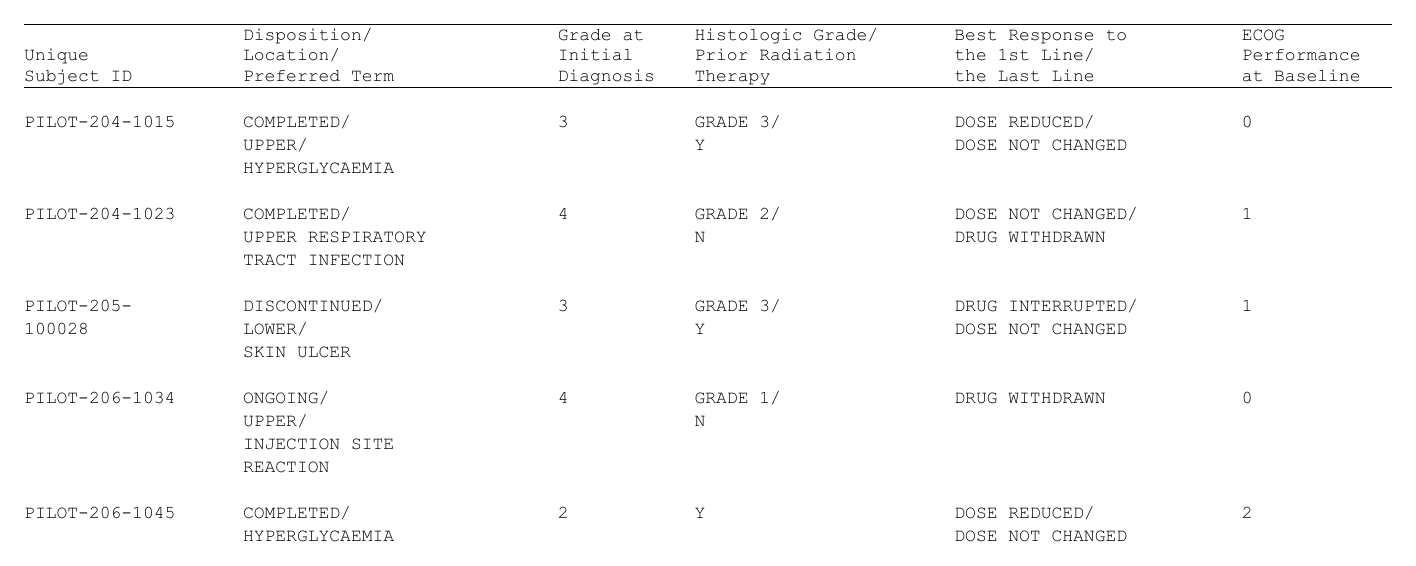
The header, the relative widths and the left alignment all
came from the spec. None of the three had to be written out: no
vector of header strings with an empty entry for every gutter, no
col_rel_width = c(15, 1, 22, 1, ...) to keep in step with
the column list, no col_spec repeating
align = "left" ten times.
Usually you do not want the intermediate object at all, and pass the
spec straight to as_rtftables():
pages <- as_rtftables(adsl, listing = spec)
length(pages)
#> [1] 1
The two forms produce the same tables. Reach for
build_listing() when you want to look at – or patch – the
reshaped data before it is rendered; reach for listing =
the rest of the time.
Keeping a subject whole across a page break
Give it a row budget and it paginates, never splitting a subject’s block:
pages <- as_rtftables(adsl, listing = spec, max_rows = 8)
length(pages)
#> [1] 3
vapply(pages, function(p) nrow(p$data), integer(1))
#> [1] 8 4 8
pages[[2]]
#> ───────────────────────────────────────────────────────────────────────────────────────────────────────
#>                Disposition/       Grade at      Histologic Grade/     Best Response to      ECOG
#> Unique         Location/          Initial       Prior Radiation       the 1st Line/         Performance
#> Subject ID     Preferred Term     Diagnosis     Therapy               the Last Line         at Baseline
#> ───────────────────────────────────────────────────────────────────────────────────────────────────────
#> PILOT-205-     DISCONTINUED/      3             GRADE 3/              DRUG INTERRUPTED/     1
#> 100028         LOWER/                           Y                     DOSE NOT CHANGED
#>                SKIN ULCER
#>
#>
#> <rtftable> 4 rows x 11 columns
#>   Columns:    Unique Subject ID |  | Disposition/ Location/ Preferred Term | …
#>   Row title:  col 1
#>   Borders:    set
#>   Widths:     relative 15:1:22:1:9:1:18:1:20:1:11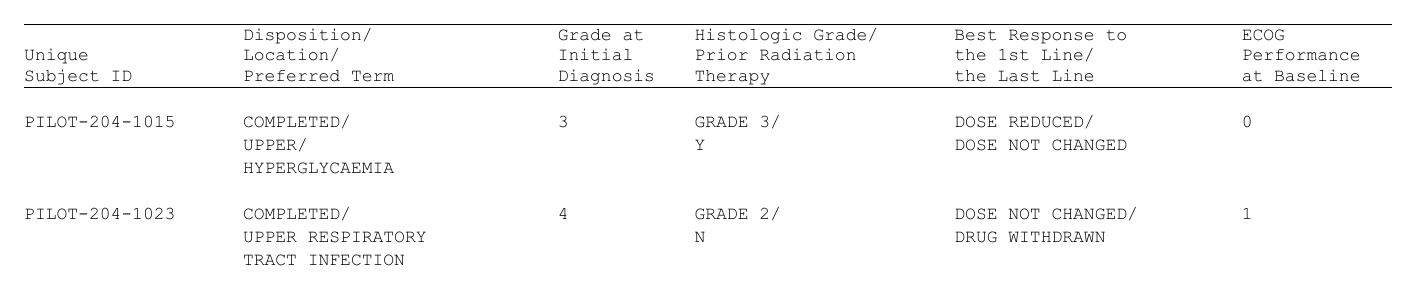
Nothing new implements that. build_listing() emitted the
.rtf_record column, and the hook pointed the machinery that
was already there at it:
Show code
# what as_rtftables(listing = spec, max_rows = 8) sets for you
as_rtftables(body, max_rows = 8,
             group_col = ".rtf_record",   # a group is one subject's block
             group_by  = "value",         # a new value starts a new group
             split     = "group_safe",    # fill the page, never split a group
             drop_cols = ".rtf_record")   # ... and never print it
drop_cols columns are hidden after
pagination, which is why a column can decide the page breaks and still
never appear. Every one of those is a default: pass
split, group_col or drop_cols
yourself and the hook leaves your choice alone.
The whole report
Landscape, because a listing is wide; a title block, a footnote block, and the file:
Show code
pages <- as_rtftables(adsl, listing = spec, max_rows = 8)

doc <- rtf_document(
  page = list(orientation = "landscape", paper_size = "A4",
              margin_top_in = 0.5, margin_bottom_in = 0.5,
              margin_left_in = 0.5, margin_right_in = 0.5),
  default_format = list(font_size_half_points = 16L)
) |>
  rtf_section(
    header = rtf_header(list(
      c("Listing 16.2.4.2.1.2"),
      c("Baseline Characteristics"),
      c("<Safety Analysis Set>")
    )),
    footer = rtf_footer(list(
      c(l = "ECOG: Eastern Cooperative Oncology Group")
    ))) |>
  rtf_tables(pages)

path <- file.path(tempdir(), "listing-16-2-4-2-1-2.rtf")
generate_rtfreport(doc, path, overwrite = TRUE)
file.exists(path)
#> [1] TRUE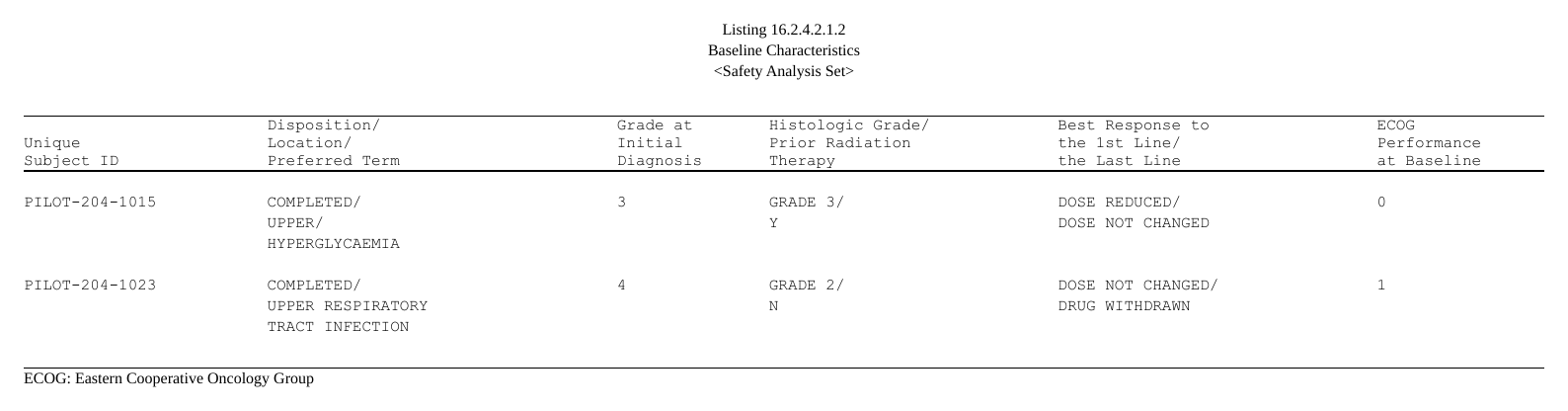
That is the whole pipeline: adsl in, one
.rtf out, with the column description as the only thing
written by hand.
Listing types
listing_spec(type = ) names a template that supplies the
defaults – separator, gutters and their width, the blank row after each
record, the default alignment, and the wrapping rule itself. One
ships:
type |
what it means |
|---|---|
"multiline" |
/ separator, gutter columns, a blank row after each
record and one at the top of every page, left aligned, and text wrapped
at the separator first and at word boundaries only where a piece is
still too long. |
Any argument you pass explicitly overrides the template, the same
relationship rtftable(border = "tfl") has with its
preset:
Show code
listing_spec(c("USUBJID", "AETOXGR"),
             sep       = " | ",   # join with something else
             spacer    = FALSE,   # no gutter columns
             blank_row = FALSE)   # no blank row between records
#> <rtf_listing_spec>
#> type : multiline
#> columns : 2
#> - USUBJID <- USUBJID
#> - AETOXGR <- AETOXGR
#> record : .rtf_recordrecord = FALSE drops the hidden record column too – do
that only if you intend to paginate some other way, because it is what a
page break is told to respect.
Because the wrapping rule belongs to the template rather than to
build_listing(), a future type can bring its own without
disturbing this one.
Changing how a cell breaks
listing_spec(wrap = ) takes a function of
(text, width, sep, layout) that returns one element per
line – the contract is in ?listing_spec. There are two ways
in, and they answer different questions.
Adjust the rule from outside.
listing_wrap() is the shipped rule, so call it and
fix up what comes back:
Show code
#> [1] "UPPER" "RESPIRATORY…"Change the rule from inside. When the break logic
itself has to differ – a different notion of a word, a byte budget
rather than a display width – listing_wrap_code() writes
the shipped rule out as source to paste into your program and edit. It
is the real code – generated from the rule itself and checked against it
by the test suite, so it cannot disagree with what the package runs.
What it hands you is the policy: the three functions a fork
rewrites. The measurements they are built on –
listing_disp_width(), listing_take(),
listing_split_after() – are exported and called, not
copied, so a fix to those reaches every fork:
src <- listing_wrap_code("my_wrap")
cat(head(src, 12), sep = "\n")
#> # The "multiline" wrapping rule from rtfreporter 0.8.2.9082, to edit.
#> #
#> #   listing_spec(cols, wrap = my_wrap)
#> #
#> # Keep the contract (see ?listing_spec): called positionally with
#> # (text, width, sep, layout); `text` is length 1; `width` may be NULL;
#> # `layout` is already "stack" or "flow"; return a non-empty character
#> # vector, one element per line.
#> #
#> # listing_disp_width(), listing_take() and listing_split_after() below are
#> # rtfreporter's own, shared rather than copied -- library(rtfreporter).
Paste it, change what you need, and hand the entry function to
listing_spec(wrap = my_wrap).
The hand-written version this replaces
Before this existed, the same listing was a page of pipeline:
catx() calls to join the columns, a
split_string() that broke a cell at / and then
at word boundaries, a get_max_element_counts() to find each
record’s height, a pad_list_elements() to pad every column
to it, unnest_longer(), a manually interleaved
S00…S08, a blank row bound on top, and a
split_df_by_blank_rows() to cut pages at record boundaries
– plus the three hand-maintained vectors (col_rel_width,
the header strings, the col_spec) that had to stay in step
with all of it.
The package’s test suite runs that pipeline – its three functions
verbatim – beside build_listing() on the same data and
compares the result cell for cell, so this article’s claim is checked
rather than asserted. Four differences are deliberate:
- A token wider than the column is hard-split. The hand-written rule pushed an empty accumulator first and let the token overflow – so such a cell opened with a blank line, and Word then wrapped the token onto a row nobody had counted.
- Widths are display widths. The hand-written rule counted characters, so a Japanese cell asked for 8 columns and occupied 16.
-
A
"\n"already in the data is honoured as a line break, before any width is considered. -
An empty cell still occupies its row. The
hand-written
split_string("")returned no lines at all, so a record whose wrapped columns were all empty lost its blank row – and with it the boundary a page split needs.
One more difference is a matter of placement rather than behaviour:
the blank row that used to be bound on top of the body is now
as_rtftables(blank_row_first = ), which the
"multiline" template turns on, so it appears at the top of
every page rather than only the first.
When not to use this
If your listing comes from rlistings, it is already
laid out: disp_cols has been applied, key-column repeat
suppression is baked into the strings, and the titles and footers travel
with it. Pass it straight to as_rtftables(), which reads
all of that:
lsting <- rlistings::as_listing(adsl, key_cols = "USUBJID")
as_rtftables(lsting, max_rows = 20)     # no `listing =` argument
build_listing() and
as_rtftables(listing = ) refuse a listing_df
for that reason, with a message pointing here. (An rlistings listing is
a data.frame subclass, so without that guard it would
quietly be treated as raw source data.)
See also
-
?listing_col,?listing_spec,?build_listing– every setting, one page each. -
?fit_listing_widths,?listing_code– the widths, and the source they come back as. -
Paginating tables with
as_rtftables()– the split strategies,group_col/group_by, anddrop_colsin general. - Importing tables – reading a table object, rlistings included, when the layout is already done.