Plot Sankey Diagram with Rectangular Nodes and Bezier Polygon Links
Source:R/sankey.R
tfl_plot_sankey.RdDraw a Sankey-style plot using ggplot2 primitives (geom_rect for nodes and
geom_polygon for links).
Usage
tfl_plot_sankey(
  nodes,
  links,
  node_id = "id",
  node_stage = "stage",
  node_label = NULL,
  node_value = NULL,
  link_source = "source",
  link_target = "target",
  link_value = "value",
  orientation = c("horizontal", "vertical"),
  baseline = c("top", "bottom"),
  scale_mode = c("auto", "shared", "adaptive"),
  shared_scale_max = NULL,
  adaptive_max_multiplier = 3,
  node_width = 0.18,
  node_gap = NULL,
  node_min_size = 0.015,
  link_curvature = 0.45,
  bezier_n = 60,
  node_fill = "#4F6D7A",
  node_treatment = NULL,
  node_line = NULL,
  treatment_color_mode = c("across_lines", "by_line"),
  treatment_palette = NULL,
  node_color = "black",
  node_alpha = 1,
  link_fill = "#CCCCCC",
  link_color = NA,
  link_alpha = 0.6,
  show_labels = TRUE,
  label_size = 3,
  label_color = "#1F2A30",
  label_nudge = 0.03,
  label_gap_scale = 0.03,
  label_position = c("right", "left"),
  use_link_color_by_source = FALSE,
  use_link_color_by_target = FALSE
)
Arguments
- nodes
A data frame of nodes.
- links
A data frame of links.
- node_id
Column name in
nodesfor unique node IDs.- node_stage
Column name in
nodesfor stage/layer.- node_label
Optional column name in
nodesfor labels.- node_value
Optional column name in
nodesfor node values. IfNULL, values are derived from links.- link_source
Column name in
linksfor source node IDs.- link_target
Column name in
linksfor target node IDs.- link_value
Column name in
linksfor link values.- orientation
Plot direction:
"horizontal"or"vertical".- baseline
Node stacking baseline:
"top"or"bottom". Link ribbons follow it: with"top"they stack from the node top downward (the ribbon toward the top-most counterpart node attaches at the top), with"bottom"from the node bottom upward.- scale_mode
Scale behaviour:
"auto","shared", or"adaptive".Shared maximum span used in
"shared"mode and as reference in"adaptive"mode.- adaptive_max_multiplier
Maximum magnification in
"adaptive"mode. Effective minimum span isshared_scale_max / adaptive_max_multiplier.- node_width
Width of each node along stage axis.
- node_gap
Gap between nodes in the same stage, in value units. Default
NULLresolves it automatically aslabel_gap_scale * label_size * scale basis(the value span the panel is scaled against), so the centre-anchored node labels keep at least one label-sized gap apart no matter how small the nodes are – plots sharing a scale (scale_mode = "shared") all get the identical gap. Pass a number for a fixed gap (the old default was0.03). Withshow_labels = FALSEthe automatic gap is a hairline (0.002 *basis).- node_min_size
Minimum visible node size (keeps isolated zero-value nodes visible).
- link_curvature
Bezier curvature factor in
[0, 1].- bezier_n
Number of points used to sample Bezier curves.
- node_fill
Node fill color, or a column name in
nodescontaining colors.- node_treatment
Optional column name in
nodesfor treatment class (e.g., Chemo, IO, Targeted, No Treatment). If supplied, node colors can be assigned by treatment withtreatment_color_mode.- node_line
Optional column name in
nodesfor line identifier used whentreatment_color_mode = "by_line". IfNULL,node_stageis used.- treatment_color_mode
Treatment color mapping mode:
"across_lines"keeps same treatment color across lines,"by_line"reassigns colors per line.- treatment_palette
Optional color palette (character vector). Named vectors are matched by treatment names.
- node_color
Node border color (default black). Use any color, or
NAfor no border.- node_alpha
Node alpha.
- link_fill
Link fill color, or a column name in
linkscontaining colors. The default is a single light grey; useuse_link_color_by_source/use_link_color_by_targetto color ribbons by their end nodes instead.- link_color
Link border color.
- link_alpha
Link alpha.
- show_labels
Whether to draw labels.
- label_size
Label size.
- label_color
Label color.
- label_nudge
Label offset from node edge.
- label_gap_scale
Proportionality constant for the automatic
node_gap(see there); the auto gap islabel_gap_scale * label_size * scale basis. Ignored whennode_gapis given as a number.- label_position
Side of the node the labels are drawn on, along the stage axis:
"right"(default) or"left". Fororientation = "vertical"this maps to above ("right") / below ("left") the nodes. When labels are shown, the panel is extended on the label side of the terminal stage by the span a link occupies between two adjacent stages (1 - node_width) pluslabel_nudge, so terminal-stage labels get the same room as the ones drawn between stages instead of being clipped at the device edge.- use_link_color_by_source
If
TRUE, link fill uses source node color.- use_link_color_by_target
If
TRUE, link fill uses target node color.
Details
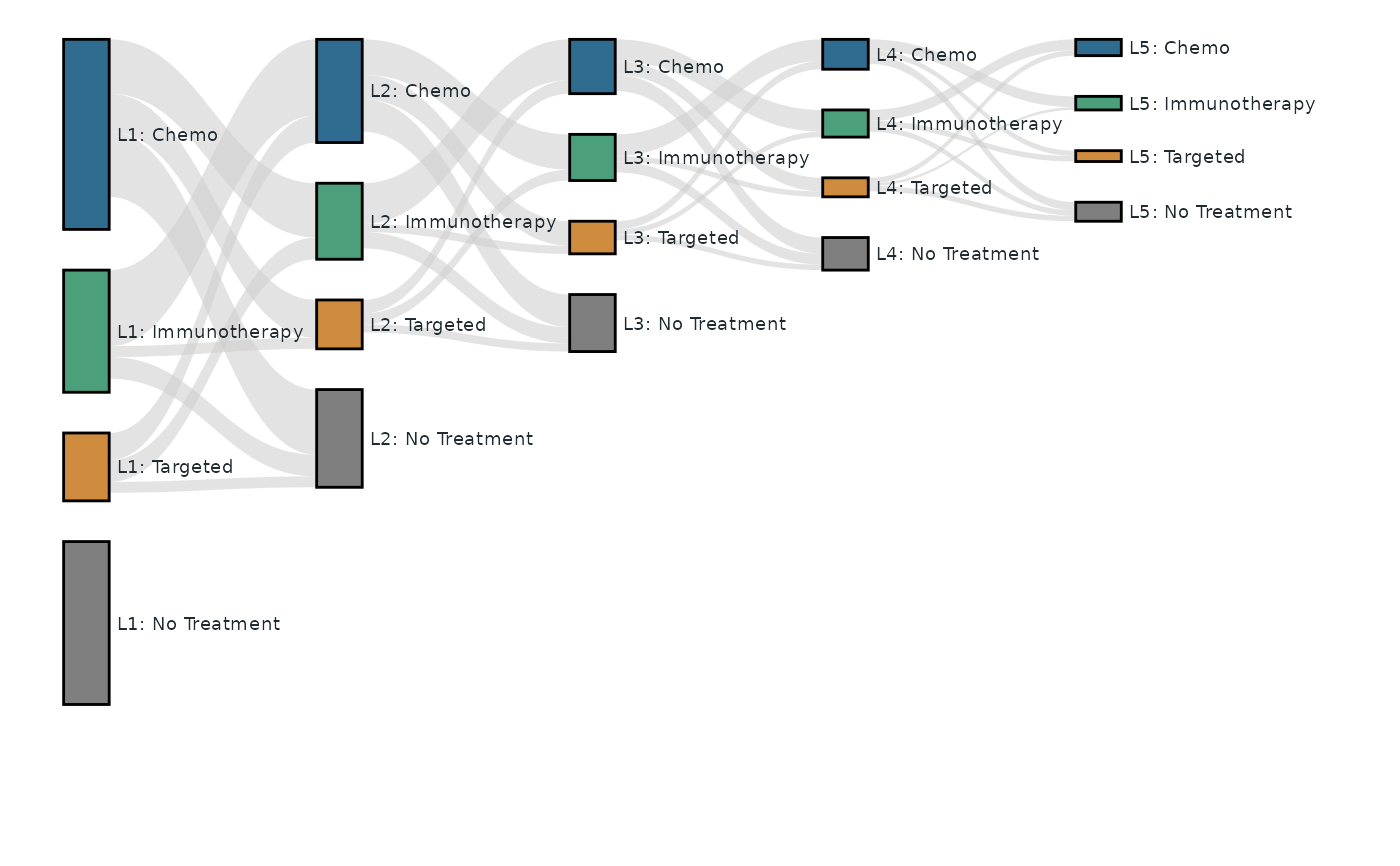
A key feature of this implementation is that nodes are laid out from the node
table rather than inferred from the links, so a node with no links at all
is still drawn, sized by its node_value. For example, a "L1: No Treatment"
group that no patients enter or leave still appears in the diagram as a
standalone node (see the example).
Examples
# A five-line oncology treatment-sequence cohort (L1 -> L5), 200 patients.
#
# The node counts behave like a real cohort: at every line about 30% of the
# patients are "No Treatment", and the total N of a line never exceeds the
# treated (non-"No Treatment") N of the previous line -- L1 treats
# 70 + 45 + 25 = 140 patients and L2 holds 120 in total; the other 20 ended
# follow-up at L1 without even becoming "L2: No Treatment".
#
# Highlighted feature: nodes are laid out from the node table, so a node
# with NO links at all is still drawn, sized by `node_value`. Here
# "L1: No Treatment" is such an isolated node -- no patients flow into or
# out of it -- yet it appears in the diagram.
trt <- c("Chemo", "Immunotherapy", "Targeted", "No Treatment")
key <- c("Chemo", "IO", "Target", "NoTx")

nodes <- data.frame(
  id        = paste0("L", rep(1:5, each = 4), "_", rep(key, 5)),
  stage     = paste0("Line", rep(1:5, each = 4)),
  line      = paste0("Line", rep(1:5, each = 4)),
  treatment = rep(trt, 5),
  label     = paste0("L", rep(1:5, each = 4), ": ", rep(trt, 5)),
  node_n    = c(
    70, 45, 25, 60, # L1: 140 treated + 60 untreated (30% of 200)
    38, 28, 18, 36, # L2: 120 of the 140 L1-treated reach L2 (30% untreated)
    20, 17, 12, 21, # L3:  70 of the  84 L2-treated reach L3 (30% untreated)
    11, 10,  7, 12, # L4:  40 of the  49 L3-treated reach L4 (30% untreated)
     6,  5,  4,  7  # L5:  22 of the  28 L4-treated reach L5 (32% untreated)
  ),
  stringsAsFactors = FALSE
)

# Flows between consecutive lines: a new line implies a CHANGE of therapy,
# so there are no same-treatment links, and every treated node also feeds
# the next line's "No Treatment" node (patients who progressed but took no
# further therapy). One value per source-target pair with the source
# cycling fastest. Column sums equal the target node sizes and row sums
# never exceed the source node sizes.
active <- c("Chemo", "IO", "Target")
flows <- list(
  c(28, 10, 20, 8, 14, 4, 24, 8, 4), # L1 -> L2
  c(15, 5, 13, 4, 9, 3, 12, 6, 3), # L2 -> L3
  c(8, 3, 8, 2, 5, 2, 6, 4, 2), # L3 -> L4
  c(4, 2, 4, 1, 2, 2, 3, 2, 2) # L4 -> L5
)
links <- do.call(rbind, lapply(1:4, function(k) {
  g <- expand.grid(s = active, t = c(active, "NoTx"), stringsAsFactors = FALSE)
  g <- g[g$s != g$t, , drop = FALSE]
  data.frame(
    source = paste0("L", k, "_", g$s),
    target = paste0("L", k + 1, "_", g$t),
    value  = flows[[k]],
    stringsAsFactors = FALSE
  )
}))

treatment_palette <- c(
  "Chemo"         = "#2F6C8F",
  "Immunotherapy" = "#4B9F7A",
  "Targeted"      = "#D08C3E",
  "No Treatment"  = "#7F7F7F"
)

# Links use the default single light grey; set
# `use_link_color_by_source = TRUE` to color the ribbons by their source
# node instead.
tfl_plot_sankey(
  nodes = nodes,
  links = links,
  node_id = "id",
  node_stage = "stage",
  node_label = "label",
  node_value = "node_n",
  link_source = "source",
  link_target = "target",
  link_value = "value",
  node_treatment = "treatment",
  node_line = "line",
  treatment_color_mode = "across_lines",
  treatment_palette = treatment_palette,
  baseline = "top",
  link_alpha = 0.55,
  label_size = 2.5
)